GUIDs are great until they are not.
A GUID gives every record a unique reference that is never duplicated, and it lets us find one specific record among hundreds of thousands. But there is a scenario where relying on one will catch you out.
Imagine this. You’re developing a solution in a development environment. You have a Property table and a Property Archetype reference table, and every property points at the archetype that describes its construction type. You build a Power Automate flow that creates Property records from an incoming data source and sets the Archetype lookup, and to do that you paste the GUID of the archetype straight out of the URL bar.
You deploy the solution to UAT. The flow fails. Why?
Because the record your flow is pointing at does not exist in UAT. This is the problem Dataverse alternate keys solve.
Why this happens
The usual shorthand is that “GUIDs change between environments”, and that is not quite right. The detail matters, because it changes how you think about the fix.
A GUID is generated at the moment a record is created. Solution components (tables, columns, flows) carry their GUIDs with them when a solution moves between environments. Data rows do not. Records are not solution components, so unless you deliberately move them, they stay where they are.
That means if you set up your Property Archetype records by hand in Dev and then set them up again by hand in UAT, you have created two entirely separate sets of records. Nothing changed. Each one was simply given its own GUID at the point of creation. The Primary Name column matches because you typed the same value twice, not because the platform preserved anything.
There is an exception. Tools like the Configuration Migration Tool move data while preserving record GUIDs. But you cannot assume that is how every environment was populated, and it does not help you at all where records were created independently.
The takeaway from an ALM perspective is not to hardcode record GUIDs in flows. Retrieving a GUID at runtime and using it further down the flow is perfectly normal. It is the hardcoded value copied out of a URL in Dev that will break on you.
So what is an Dataverse alternate key?
An alternate key is a unique constraint defined on one or more columns of a Dataverse table. It lets a record be identified by a meaningful business value instead of its system-generated GUID.
Two things make it useful.
First, you decide the value. Where a GUID is generated for you, a reference like ARCH-SEMI-1960 is something you choose and can apply consistently across Dev, Test, UAT and Production. The reference in your flow then resolves correctly wherever the solution lands.
Second, Dataverse enforces uniqueness on it. Once the key is active, any attempt to create or update a record that would produce a duplicate value gets rejected, whether it comes from the UI, a flow, the Web API or a data import.
That second point deserves a pause, because it cuts both ways. It is a genuine data quality benefit, and on a reference table it is exactly what you want. It also means you cannot create a key on a column that already contains duplicates, and once the key is live, users will no longer be able to save a duplicate value in that column.
One clarification while we are here, because it trips people up. An alternate key is an alternative to the primary key, which is the GUID. It is not an alternative to the primary name column. The primary name column is just the display label for the record and carries no uniqueness at all.
How this differs from duplicate detection rules
Dataverse has a second feature that sounds like it solves the same problem, and it is worth knowing the difference.
Duplicate detection rules flag potential duplicates and give the user the option to merge, cancel, or save anyway. They are advisory. Alternate keys are not. A duplicate that violates an alternate key is rejected outright at the database level with no override available to the user.
If your goal is data quality with human judgement in the loop, duplicate detection rules are the better fit. If your goal is a value you can rely on to identify exactly one record, you want an alternate key.
When you should reach for something else
Alternate keys are not the answer to every cross-environment problem, and reaching for one where a simpler feature fits is a common mistake.
If what you need is a value that differs per environment, a URL, an email recipient, a site address, a feature toggle, use an environment variable. Environment variables are solution-aware by design. They ship with your solution, and each environment holds its own current value, so the same flow reads the right value everywhere without you touching it.
Alternate keys are for when you genuinely need to look up a record in Dataverse. In our example, the archetype is a real row with attributes and relationships hanging off it, and the flow needs to set a lookup to it. An environment variable cannot do that.
A rough rule: config values go in environment variables, config records get alternate keys.
Constraints to be aware of
Before you start, there are a few limits to know about.
A table can have a maximum of ten alternate keys.
Only certain column types are supported: Decimal, Whole Number, Single line of text, Date and Time, Lookup and Choice. Columns with column security enabled are excluded. The maker portal filters the column list for you, which is why you may not see every column on your table when you come to create the key.
Where a key column contains a NULL value, uniqueness is not enforced for those rows. Setting the column’s required level to Business Required helps, but do not lean on it too heavily: Business Required is enforced by model-driven app forms, not by the platform. A record created through a flow, an import or the Web API can still land with the column empty.
And one that catches people out. If a value in a key column contains any of the characters / < > * % & : \ ? +, then retrieve, update and upsert operations performed using that key will fail. The value itself stores fine. It is the lookup by key that breaks.
For property data this is a live risk rather than a theoretical one. A code you define yourself, like ARCH-SEMI-1960, is safe because you control the format. A legacy reference inherited from another system, or anything derived from an address, is not. UK address data routinely contains forward slashes in flat numbers like 12/A, and ampersands turn up in scheme and estate names. Sample the column before you commit to keying on it.
A word on autonumber columns
Autonumber columns look like the obvious candidate. They are a single line of text, they are already unique, and they are already sitting on the table.
They are still the wrong choice for cross-environment referencing, and for a reason that is easy to miss. The autonumber sequence is generated per environment. ARCH-0001 in Dev and ARCH-0001 in UAT are two unrelated records that happen to have landed on the same value. Nothing links them.
For a key you intend to reference in a flow that gets deployed, use a value you set deliberately. ARCH-SEMI-1960 means the same thing everywhere because you decided it does.
Setting up an alternate key
Head to make.powerapps.com, open your solution, and find your table. Under the Schema section, select Keys.

Select New key. Give the key a Display Name, which can match the column name, then tick the column you want to use in the Columns list.
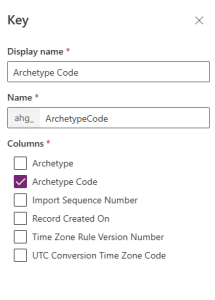
If you tick more than one column, it is the combination that has to be unique rather than each column individually. So a key on Archetype Code and Region would allow the same Archetype Code to appear twice, as long as the Region differs.
Then select Save.
Your key now appears in the list with a status of Pending. Behind the scenes, Dataverse has queued a system job to build the supporting database index, and the key stays at Pending while that runs. On a small reference table this takes a couple of minutes. On a table with a lot of rows it can take considerably longer.


Refresh until the status reads Active, and do not build anything that depends on the key until it does.
If the job finds duplicate values in the column, key creation fails rather than completing. You will need to clean the data and create the key again.
Finding the logical name
To reference the key in a flow you need the column’s logical name, which is not always what the maker portal shows you at first glance.
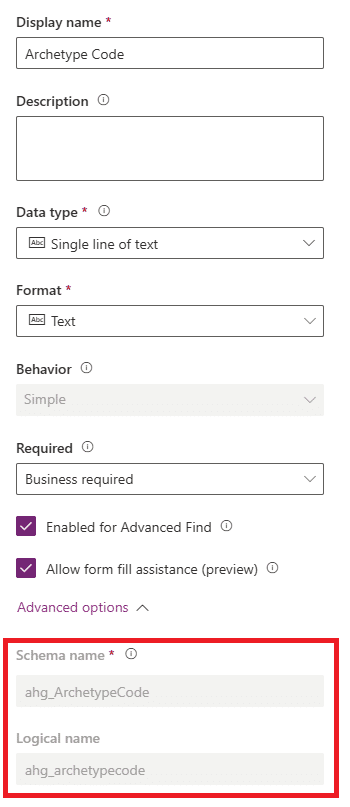
Open the table, go to Columns, and open the column you used for the key. The Name field shows the schema name, which includes your publisher prefix and may contain capital letters, for example ahg_ArchetypeCode.
The logical name is the same string in lower case: ahg_archetypecode. Logical names in Dataverse are always lower case, so if you have capitals, drop them.
Using an alternate key in Power Automate
This is where it pays off.
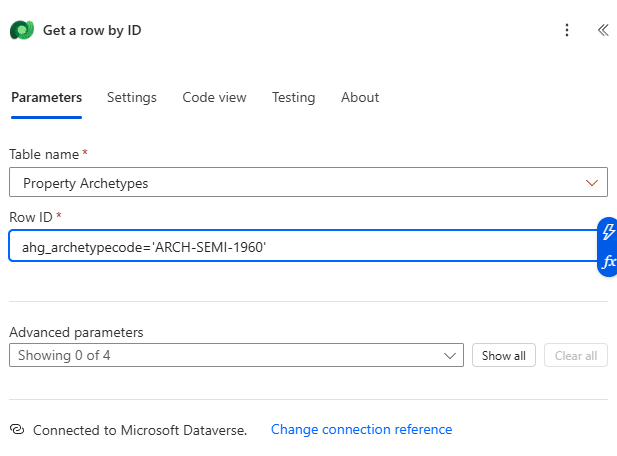
In the Get a row by ID, Update a row and Delete a row actions, the Row ID field will accept an alternate key reference instead of a GUID. The format is the logical name of the key column, then the value:
ahg_archetypecode='ARCH-SEMI-1960'
Text values go in single quotes. Numeric values do not need them. For a multi-column key, separate the pairs with a comma:
ahg_archetypecode='ARCH-SEMI-1960',ahg_region='NORTH'
Setting a lookup without resolving a GUID
The second use case is arguably the stronger one, and it is the one that solves our opening problem.
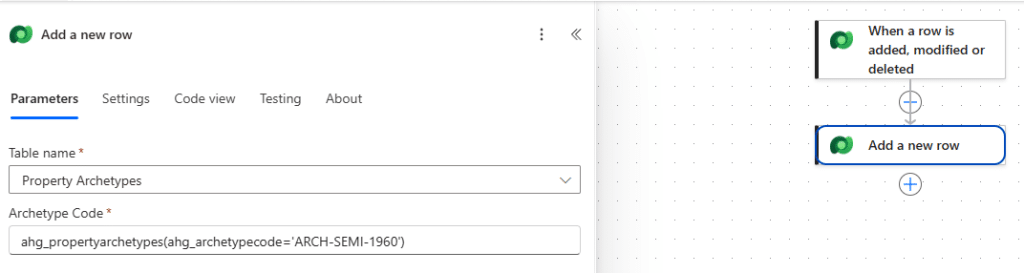
When you create or update a record and need to set a lookup column, you can point at the target record by its alternate key rather than its GUID. In the Add a new row action, the lookup field takes the table’s entity set name followed by the key in brackets:
pps_propertyarchetypes(pps_archetypecode='ARCH-SEMI-1960')
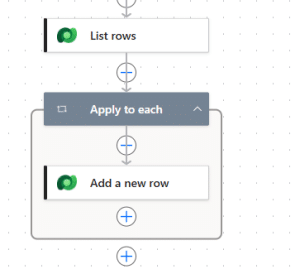
That removes the List rows, Apply to each and first() pattern you would otherwise need purely to resolve a GUID. Fewer actions, fewer API calls, and a flow that is a lot easier to read six months later.
More to the point, it deploys. The same expression resolves in Dev, Test, UAT and Production, because the value it depends on is one you set rather than one the platform generated.
When the key does not resolve
Worth knowing before you go looking for it in a run history. If the value you pass does not match a record, the action fails rather than returning an empty result. Dataverse cannot find the record, so it errors.
That is usually the behaviour you want, since a missing reference record is a real problem and you would rather know about it. If you need the flow to carry on regardless, handle it with a Scope and a Configure run after, rather than assuming an empty check will catch it.
Upsert, briefly
There is one more thing alternate keys unlock that is worth flagging even though it sits slightly outside the standard connector actions.
Because a record can be addressed by its key, the Web API can perform an upsert: send the record, and Dataverse updates it if a match exists or creates it if one does not. For integration work, where you are receiving a feed of records and do not know which are new, that collapses a whole pattern of checks into a single call.
The standard Dataverse actions in Power Automate do not expose this directly. You reach it through the Web API, which means an HTTP action rather than Update a row. That is a post of its own, and I will come back to it.
A note on when to set them up
Alternate keys sit quietly in the maker portal until the moment you need them. If you’re building anything that moves between environments, or integrating with a system that holds its own identifiers, they are worth setting up early rather than retrofitting after a deployment has already broken something.