

The agent’s story actually begins back in 2025, when in its infancy it was a straightforward knowledge agent. Ask it a question, and it would search our SharePoint site for the answer. Simple — but effective. Early feedback from the team was genuinely positive; it was surfacing answers to process questions far faster than waiting on me, and it gave the team a degree of independence they didn’t have before.
That said, a knowledge agent has its limits. It relies entirely on the knowledge source being accurate and up to date, and critically, it can’t do anything — it can only tell you things. That limitation is what drove the next phase of development.
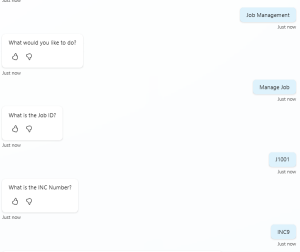
Today, the agent has a set of custom topics that are triggered when specific phrases are used — such as “Record Management” or “Manage Job”. Once a topic is triggered, the agent asks the user what they would like to do, presenting a structured list of available actions. The screenshot below shows this topic in action, reproduced to protect live data.

Once the user makes their selection, the agent follows the corresponding path and asks a follow-up question to capture the record number. That value is saved as a variable and passed directly into an Agent Flow in Power Automate.
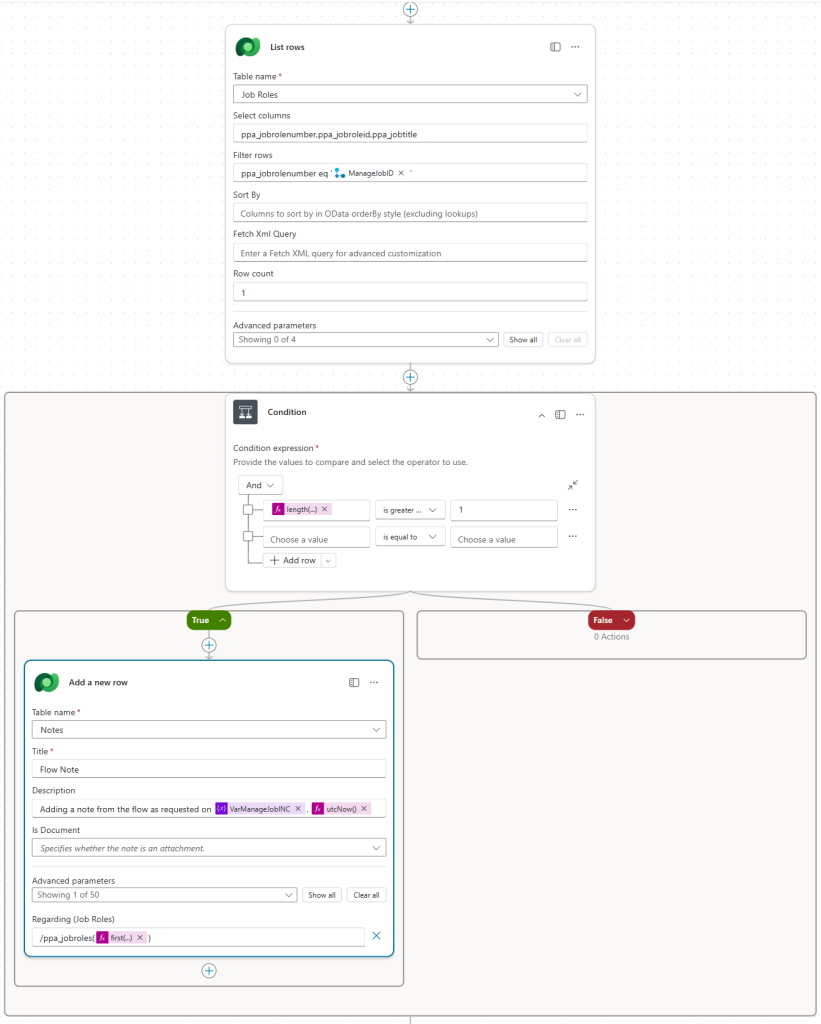
This is where the real work happens. The flow first validates that the record exists in Dataverse. If it does, it carries out the requested changes, writes an audit entry to the record’s timeline with a clear description of what was done and why, and returns a response back to the agent. The agent then confirms the outcome to the user — success if the record was found and updated, or a clear failure message if it wasn’t. The screenshot below shows the flow structure, again reproduced to protect live data.
The CoPilot Studio Topic
The topic is triggered when the user says certain phrases — in the mockup reproduced here, those phrases are “Job Management” and “Manage Job”. Once triggered, the agent presents the user with a set of multiple-choice options. Depending on the selection, it follows that specific path and set of actions — in this mockup, the option chosen is “Manage Job”.
Once the choice has been made, the topic asks two follow-up questions:
- What is the Job ID?
- What is the INC Number?
We’ll come back to why that second question matters shortly. With both answers captured, they are passed to the Power Automate flow as variables.
The Dataverse Record Update
With the variables received from the agent, the first step in the flow is to initialise them. This gives us much greater flexibility in how we work with the data downstream, and in my production environment I also initialise a Message variable at this stage — more on that shortly.
With the variables initialised, the flow checks whether the record provided by the user actually exists, using the List Rows action against the relevant Dataverse table. This is the first layer of governance — we only want to act on records we can confirm exist, and we want to remove any possibility of an error caused by an incorrect ID being passed in.
If no matching record is found, the flow follows the False path and sets the Message variable to inform the user that the record could not be found. If the record does exist, it follows the True path and proceeds.
With the record confirmed, the flow updates it as instructed. It’s worth noting that in a production environment, auditing should be enabled on any entity you’re modifying — if it is, the changes made here will appear in the audit trail. However, the audit trail alone doesn’t tell you why the change was made, or who originally requested it — particularly relevant when changes are being executed by a Service Account rather than an individual user. That’s exactly the gap the next step addresses.
The Timeline Audit Entry
A record timeline is designed to capture everything that has happened with that record. Take a support case as an example — the timeline might contain the original inbound email that opened the case, notes from calls made to other teams, referrals, and the final response sent back to the customer. It’s the full story of that record in one place.
Adding an entry to that timeline from the flow was therefore the natural way to close the governance loop — and following thorough testing in a reproduced environment, this action has now been implemented in the production solution. Every record management action taken through the agent is recorded directly on the record’s timeline, capturing what was changed, when, and critically — why.
Because a timeline isn’t a Dataverse entity in its own right, the way to write to it is by creating a Note record against the Annotation entity. The Annotation entity is a Polymorphic Table (You can read more about Polymorphic Table’s on Microsoft Learn), meaning it can be related to multiple different entity types — which makes configuring this action slightly more involved, but entirely achievable.
As shown in the screenshot, the Regarding field of the Note references the table of the record we’ve just modified (in this mockup, /ppa_jobroles), followed by a reference to the specific record — identified as the first result returned by the earlier List Rows action.
Now — remember that second question the agent asked after the action was selected? “What is the INC Number?” That variable is placed into the description of the Note. In the mockup, the description reads:
“Adding a note from the flow as requested on [VarManageJobINC] [UTCNow]”
VarManageJobINC = the incident reference number provided by the user · UTCNow = the timestamp of the action
This is what completes the governance piece. If anyone questions why a record was changed, there is a clear reference number on the timeline that can be traced back to whoever raised the request and the reason it was made — all without any manual effort from the person who actioned it.
With the timeline entry written, the flow sets the Message variable to confirm the action was completed successfully. That message is passed back to the agent, which relays it directly to the user.
