PowerApps

Mastering Canvas App Components: Build Once, Reuse Everywhere

If you’ve ever found yourself copying and pasting the same header, footer, or navigation menu across multiple screens in a Power Apps canvas app, you’re not alone. This repetitive work not only slows down development but also creates a maintenance nightmare when you need to update styling or functionality. The solution? Canvas App Components. In […]

Mastering Canvas App Components: Build Once, Reuse Everywhere Read More »

Commenting Power FX Code: Best Practices and Copilot Tips for Power Platform Apps

When building Power Platform solutions, it’s easy to focus on delivering features and forget about one vital aspect: documenting your formulas and expressions. But clear, concise comments are not just a developer nicety—they are an essential part of sustainable and supportable app development. Whether you’re designing complex business logic, handing off your app, or troubleshooting

Commenting Power FX Code: Best Practices and Copilot Tips for Power Platform Apps Read More »

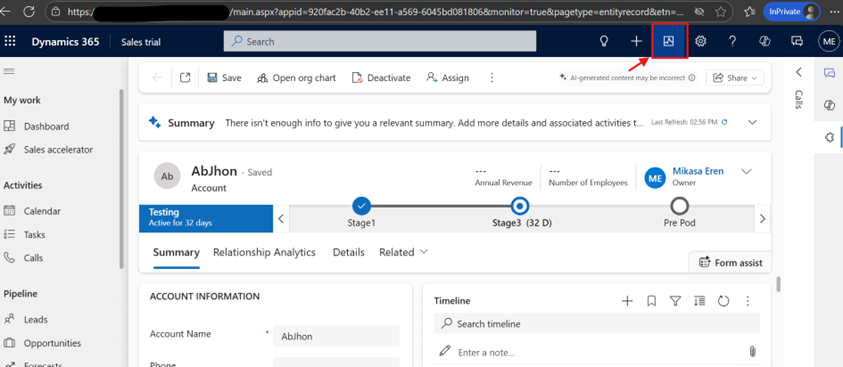
Fix Business Process Flows Not Showing: Monitor Tool Guide

I recently encountered a frustrating issue in my Power Platform environments where newly created Business Process Flows (BPFs) refused to appear in my model-driven app. Despite checking all the usual suspects—permissions, app configuration, the accent color bug, activation status, and entity attachments—the BPFs remained stubbornly invisible. After reaching out to fellow Power Platform evangelists on

Fix Business Process Flows Not Showing: Monitor Tool Guide Read More »

How to Create Rollup and Calculated Columns in Power Platform: A Complete Guide

Introduction: From PL-900 to Real-World Implementation Imagine discovering that your project budget tracking is completely unreliable because team members are entering costs manually into free-text fields. This was exactly the challenge I faced while developing a Model Driven App for project management—and here’s how Power Platform’s rollup and calculated columns solved it. Following my success

How to Create Rollup and Calculated Columns in Power Platform: A Complete Guide Read More »